
Meet Autopilot: a better way to budget
The magic of Crew's Autopilot is that money is set aside before you have to think about it. No more holding due dates and balances in your head. The app follows your budget for you.

You book the vacation. You get the concert tickets. Then you remember the car insurance premium that hits next Tuesday.
Autopilot is Crew's answer to that particular sinking feeling. At its simplest, it routes your paycheck to where it needs to go — watching money coming in and bills going out, and setting aside what each bill needs before the due date arrives. When the charge lands, the cash is already there.
New to Crew? Crew is a financial technology app built around pockets: labeled sub-balances inside your account that let you separate money by purpose instead of tracking it all as one lump. Autopilot is the layer that fills those pockets for you.
The short version
Tell Autopilot what's coming. It makes sure enough is set aside.
That's the whole idea. No manual transfers, no mental math, no scrambling when a due date sneaks up on you. The money Autopilot sets aside sits in your Autopilot Reserve, and your "Safe to spend" balance on the Banking page leaves it out — so what you see is what's genuinely yours to use.
Setting up Autopilot
Start with your income. Add the paychecks, deposits, and scheduled transfers you expect, and how often they land. This is what Autopilot works from.
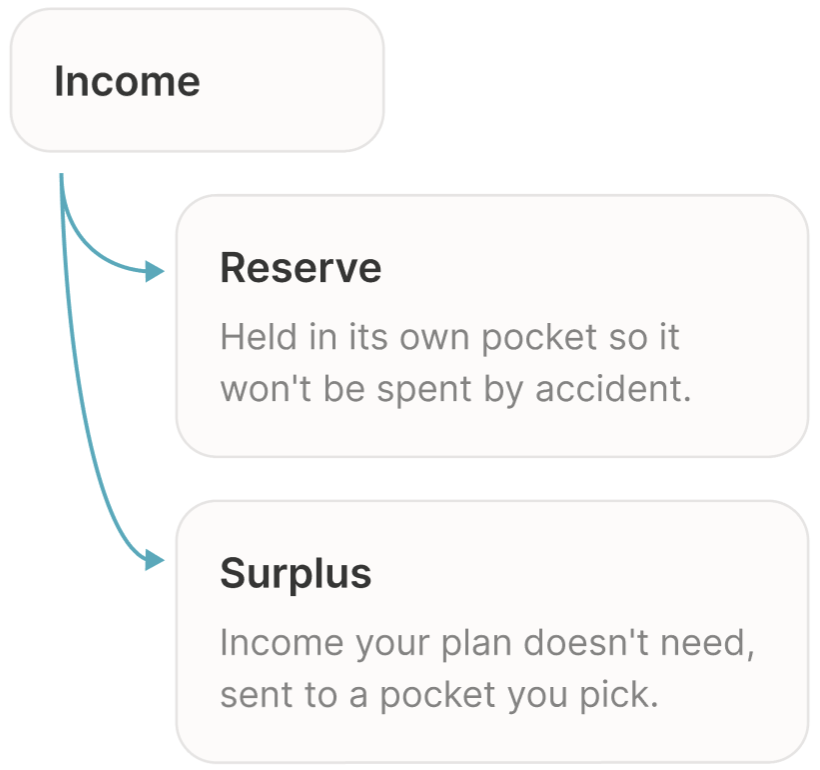
Then your bills. Each bill gets an amount, a due date, and identification rules — a matching range for the amount and date, plus a transaction name filter — so Autopilot recognizes the right charge when it shows up and doesn't mistake something else for it.
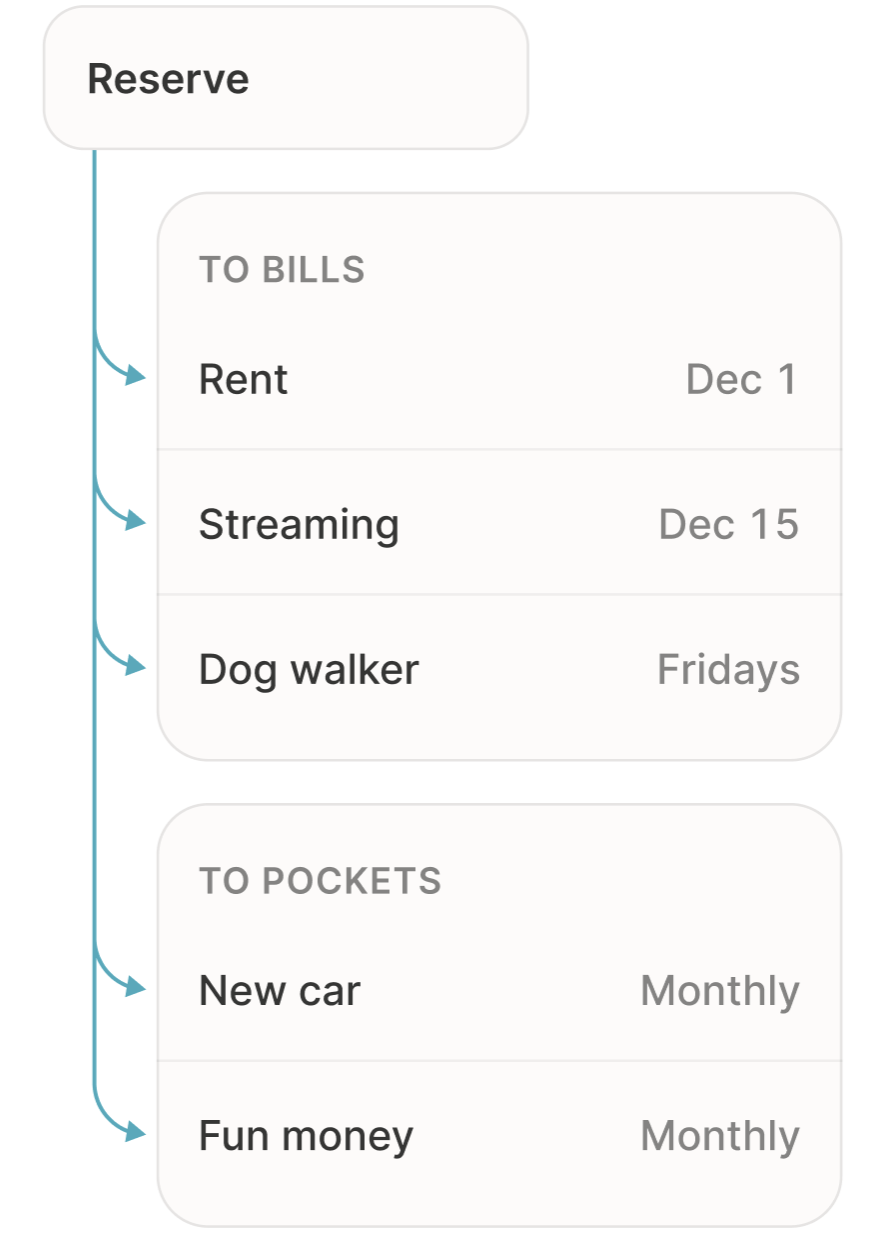
Then your pockets. Saving toward something, or want a pot of guilt-free spending money? Set a goal and a schedule, and Autopilot contributes to that schedule the same way it handles a bill.
Your bills almost certainly don't share a single rhythm, and they don't have to. Autopilot reserves for weekly, bi-weekly, semi-monthly, monthly, semi-annual, and annual schedules, plus custom ones for anything that doesn't fit a pattern. If it has a date and an amount, Autopilot can plan for it.
How Crew decides what to set aside
Here's where Autopilot is smarter than it looks.
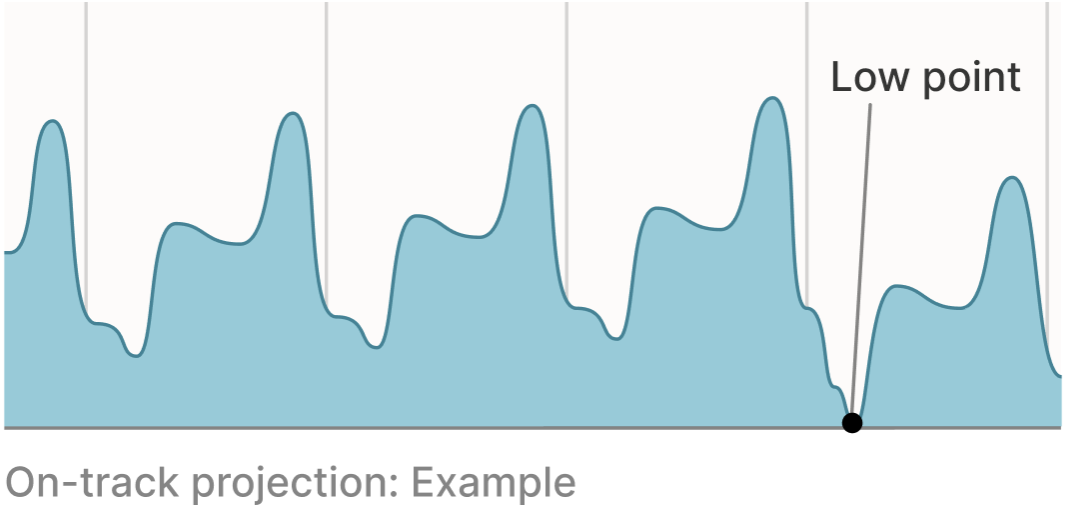
Autopilot takes everything you've told it — income, bills, pocket contributions — and projects the whole picture forward, as far as five years out. Then it works backward from the lowest point in that projection. Your on-track balance today is exactly enough that the low point doesn't dip below zero. Change your plan and it recalculates.
Say you've got $1,400 rent, a $70 internet bill, a $17 streaming subscription, and the $1,560 annual insurance premium you always forget about. Autopilot doesn't fund those four things in four separate buckets. It looks at all of them across the years ahead, finds the moment you'd come up short, and takes enough from each paycheck to plan ahead.
One useful consequence: your reserve holds less than it would if every bill were funded separately. Bills on staggered schedules end up sharing the same dollars — one is paid off before the next needs funding — and Autopilot plans around that overlap. Less of your money sits idle, and more stays available to you.
"Can I still get to that money?"
Of course! That's a fair question, and the one we hear most about any feature that sets money aside.
You can't pull money out of your reserve with a manual transfer — that's the point, so it can't be spent by accident. But it's still your money, and there are two ways to reach it.
If a payment should have come out of the reserve, assign that transaction to its bill (or create a new bill from it) and Autopilot covers it from reserved funds.
If you need the money for something else entirely, pause the bill or the pocket contribution it's being held for, and its share is released back to you. You don't have to switch off Autopilot to free up one thing. And if you do switch Autopilot off, the whole balance returns to your source pocket.
When real life doesn't match the plan
Bills drift, paychecks wobble. Autopilot adjusts.
Variable bills, like electricity. A bill's amount never changes on its own — you're in control. New bills start at whatever the last payment was, and from there you pick. Reserve the low end to keep more cash free month to month. Reserve the high end so a big month can't knock you off track. Or reserve the average and split the difference. If a payment comes in higher than you set aside and you were on track, Autopilot pulls in the difference. If you were already off track, it leaves it alone so you can top up on your own schedule.
A bill lands early. Bills are ready by their due date, and if the charge arrives a few days ahead, Autopilot pulls what it needs from your funding pocket. Want the money ready sooner, every time? Add buffer days in settings.
A bill lands late. It gets an Overdue badge and its money stays reserved for 10 days past the due date, so the payment is covered whenever it shows up.
Your paycheck is early or late. If it lands within about five days of the expected date, Autopilot recognizes it and routes it as usual — the reserve takes what the plan needs, the rest goes to surplus a bit sooner. A late paycheck alone won't bounce a bill, since payments draw on your whole account rather than just the reserve. Autopilot catches up with your next income.
A few settings worth finding
Where your surplus goes. Once bills and contributions are covered, whatever's left lands in the pocket you choose.
Buffer days. Have money ready a few days before due dates, across the board.
Virtual cards. Attach one to a bill and set a limit, and any charge over that limit is declined. A bill can't quietly come in over budget.
Some things Autopilot doesn't do
Deleting a bill doesn't cancel it. A bill in Autopilot is your plan for the bill, not the bill itself. Delete it and the reserving stops, the money comes back to you, and the real charge keeps arriving. To end a subscription, cancel with the provider.
It won't tell you what's reserved for one specific bill. There isn't a per-bill number — it's one pool, deliberately smaller than the sum of its parts. That's the trade for holding less of your money.
The takeaway
Autopilot takes the most tedious part of managing money — right amount, right bill, right time — and runs it quietly in the background. You don't have to become a budgeting person to get something out of it. If one of you loves a spreadsheet and the other would rather not think about money at all, it's built to work for both.
Already on Crew? Open the Autopilot tab to switch it on or review your settings.
New here? We'd love to have you. Opening an account is free, there's no minimum deposit, and most people finish signing up in under two minutes.
Crew is a financial technology company, not a bank. Banking services provided by Bangor Savings Bank, Member FDIC.
More articles

Holidays on a budget: decide what the holidays will cost before Black Friday decides for you
Ever had a slightly tense conversation about money in January? A twenty-minute plan for picking a holiday number with your partner before the sales start.

Board games that teach kids about money better than a lecture
No kid ever changed their money habits from a lecture. Here are the board games — sorted by age — that teach real financial lessons, plus a few that cost nothing to play.

The Autopilot Revamp: Meet the Self-Budgeting Account
Most accounts can show you your balance. The new Autopilot helps you understand and control your money — projecting your cashflow years ahead and funding your bills and goals automatically.